

Easy Time Clock Features
Easy to use for Employers and Employees!
Powerful Time & Attendance Software for Streamlined Workforce Management
Easy Time Clock is an all‑in‑one time and attendance solution designed to simplify employee management for businesses of every size. With robust features like PTO tracking, GPS and IP‑based location restrictions, payroll integration, and detailed project and break monitoring, Easy Time Clock helps companies save time, reduce errors, and improve workforce accountability.
Time Card Features for Employers:
Time Card Features for Employees:
Watch Videos to learn more about:
Web – Employees log into the website using a computer, a tablet, or a browser on their phone. From there, they can clock in and out and view their time card. Location restrictions available.
Mobile App – Download a free mobile app from the App Store or Play Store for clocking on-the-go. GPS restriction and tracking available.
Reader – Employees scan their badge, finger, or face at a machine connected to Ethernet or WIFI. The punch is sent to the system through the cloud.
By default, only the Admin username can edit employee time cards, but the Admin can grant this access to supervisor usernames, or even the employee, if applicable. All edits are logged in the Access Report and can be identified by an *asterisk next to the time. The Admin can be emailed any time an edit is made. For supervisors with lower responsibility, access can be limited to only view time cards without editing.
Time Card Edit allows you to add, edit, and removed time, add PTO hours, add lunch or break entries, enter unpaid hours, add other entries like mileage and reimbursements, and approve time cards.
View time card data in real time using various report styles. Reports will calculate totals with any overtime, double time, paid time off, and pay rate totals you have set in the account. Most reports can be printed and, or exported to Excel. Time Card reports can be customized to display as much or as little information as you need. All reports are stored in archive after 18 months.
These are our most popular reports:
- Detailed – View clock in times, daily, weekly, and pay period totals, and gross pay calculations for all employees, broken down by project, worksite, or PTO category.
- Summary – View pay period totals for all employees, export data to payroll software.
- Authorization – Print out a report for each employee with a signature line and a supervisor signature line.
- Who’s In – See in a glance who is currently clocked in and who is has clocked out for the day.
- Access Report – This Admin exclusive report serves as a complete audit log for all activity in the account. Recover deleted data, monitor employee activity, and retrieve IP Adresses and GPS locations used to access the site.
Usernames are created with very limited access. A standard username can view their own time card, the Who’s In report, and a company calendar. When granted “Supervisor” access, a username can view and, or edit the time cards of the employees in their department. Usernames can also be granted access to some Admin pages. Supervisors can also approve time cards for the employees in their department.
Set up accrual guidelines for paid time off categories like vacation, sick, and personal time. Track usage and balances for each employee. Within the PTO feature, “Leave” allows accruals to post after a certain amount of hours have been worked, complying with several state sick leave laws.
By default, employees can clock in from any web enabled device. However, we offer several access restriction options. Restrict logins by IP Address, browser, or to a specific download called “ETC Vault.” Mobile app clock ins can be restricted to specific geofences, and employees can be set to only clock in and out on the mobile app. If you have a fingerprint or badge reader, employees can be blocked from using another clocking method.
Location restrictions aren’t the only way to designate how employees clock in. If employees work the same schedule every week, you can set a shift to restrict early clock ins or late clock outs (feature not compatible with readers).
Keep track of where employees are working, or what they’re working on. The Worksites feature is an easy way for employees to indicate their location at the time of clock in. Projects work similarly, but can be individually assigned, and can have custom pay types (overtime, double time, exempt rate) or different pay rates.
You can set up custom breaks, lunches, or other rest periods that can be paid or unpaid. You can set a limit for how much time is paid. For unpaid lunches, you can require a certain amount of time before the employee is allowed to clock in again (feature not compatible with readers). If using readers, a button can be set up on the device to represent each break.
Do employees not have access to the time clock during the work day? Use AAutomatic Lunch to deduct a lunch time from the time card each day.
Do you want employees to approve their time cards before you run payroll? We have several approval options available. Digital approvals will display approval status on select reports, and approved time cards will lock the pay period from any additional punches or changes.
Printable:
- The time card can be printed by the employee, and signed on a signature line.
- The Individual Report includes an employee signature line and can be printed all at once, with each employee on a separate sheet.
- The Authorization Report is similar to the Individual Report, and has customizable signature statements for employees and supervisors.
Digital:
- The employee time card can include an “Approve for Payroll” button with a customizable approval statement.
- An approval button can be activated for supervisors. If both employee and supervisor need to approve the time card, the system will require the employee’s approval before the supervisor can utilize the button.
- An Admin approval will approve and lock all time cards at once.
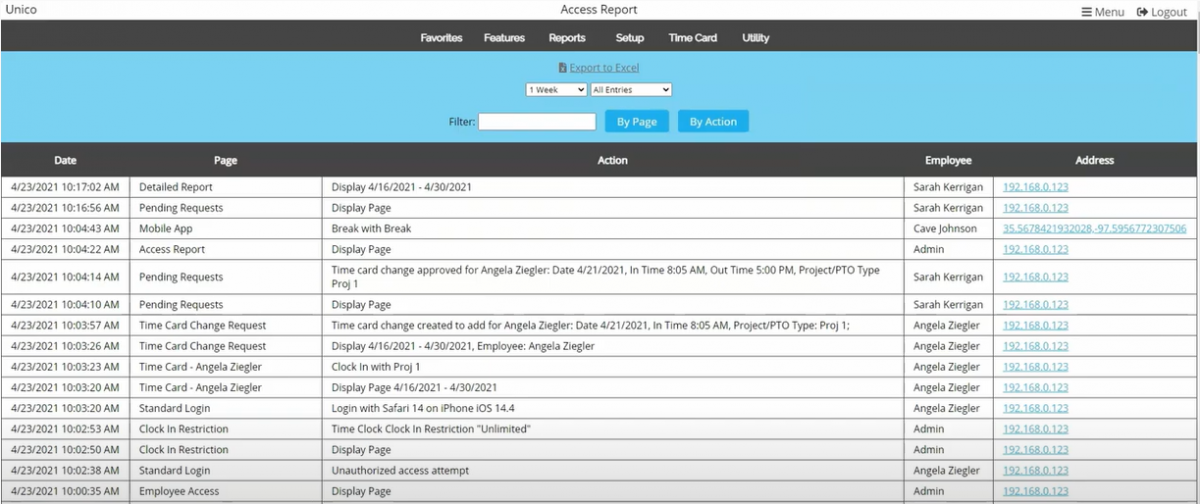
Every action taken by any username is logged and stored in the Access Report. This report logs changes for easy retrieval of accidental edits. It can also be used to monitor employee activity within the account. All logs include an IP address, or GPS coordinates if using the mobile app. Clicking these links will show you network information for the IP address and a map of the GPS coordinates. All logs are stored in archive after 4 weeks.
If your payroll company is listed here you may be able to export time card data straight to payroll without any time consuming data entry. The Summary Report can be exported to your computer, then uploaded when logged into your payroll software.
We have 2 programs available for reselling ETC services: Reseller and White Label Reseller. Choose which option fits your needs and apply today!
Want to See More?
If you’re not ready for a trial, but want to see what the system looks like, try one of our demo experiences.